Showing posts with label Cricut. Show all posts

Wednesday, September 15, 2010

"Dates to remember" book.

I just finished my latest project for SVGCuts.com.  This time, I decided to use my new tool, the Cinch (it's awesome!) and make a book.  I'm so disorganized when it comes to remembering friends and families birthdays.  So - in hopes of being more efficient, I've decided to put together a book to keep all the special dates together.  I put in many hours of labor into this, probably making this the most elaborate project I've done.  However, I just love Mary's SVGs, I started cutting, and I wanted to include them all into my book. You can hopefully understand why I get so out of control when you see all her images!

So, here's the completed project:

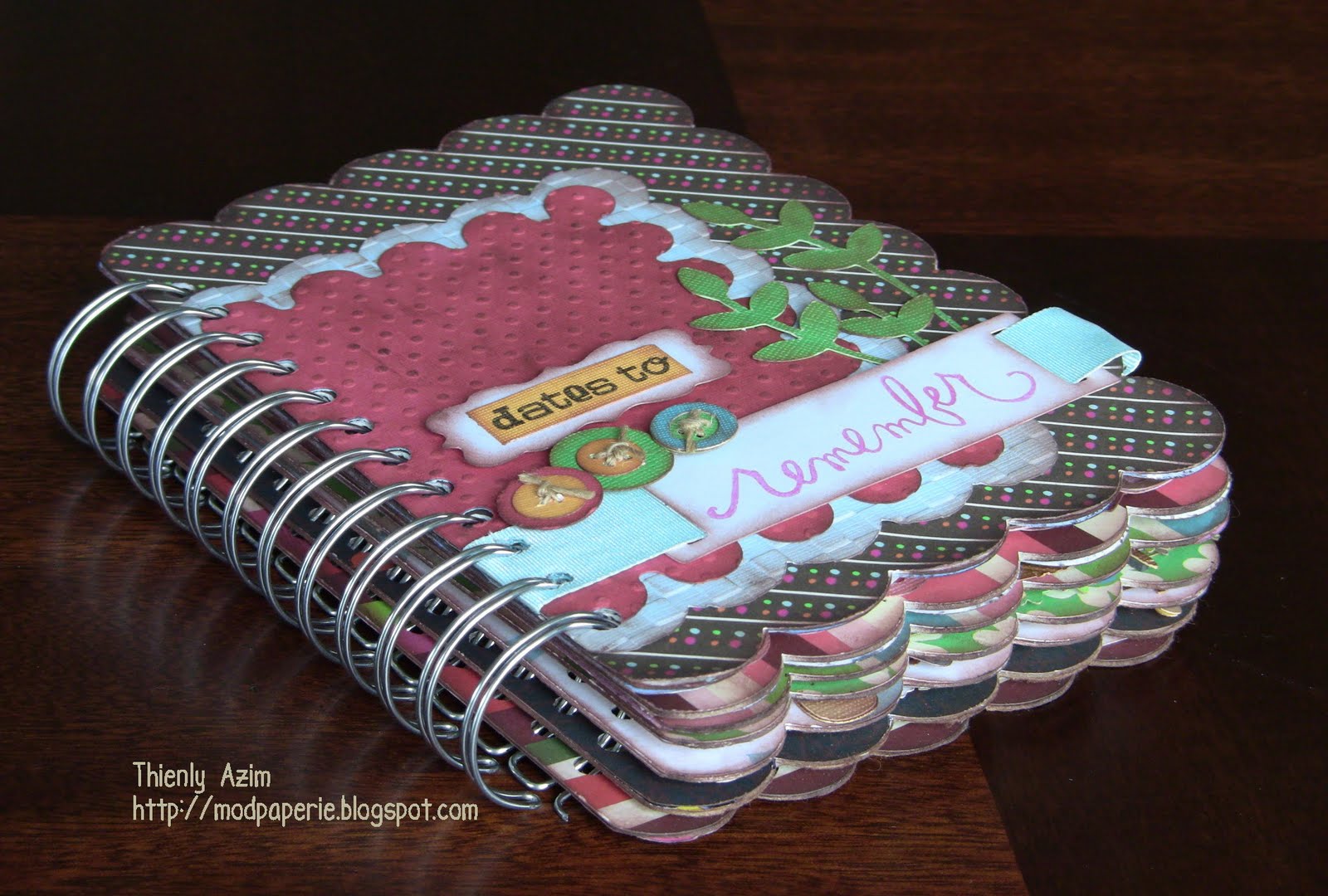
For more detail on the specific collections used and the dimensions, please see SVGCuts blog.  Click here.

Sunday, August 15, 2010

My poor neglected Cricut cartridges.

During my little down time today, I decided to try out the Give a Hoot cartridge.  I had this for quite sometime, but since I started purchasing SVG Cuts files, my poor cartridges have been neglected.  I guess it's good though - there's probably soo many cartridges that I would've purchased by now if it wasn't for SVG Cuts.  Then again, I may have to come up with excuses to buy them as well :) 

Here's some cards that I'll share with you today:

Thursday, July 22, 2010

Christmas in July Series - Part 5

Here's the final set of Christmas cards that I'm sharing with you all.  It is from last year and it was my first set that I made using Cricut. 

I have always been curious about the "snow globe" files, and thought that there would be a lot of potential to do something neat.  So, I decided to used the one from Joys of the Season cartridge, and contemplated for a while if I should weld the image and make a card, or the bottom part would open up and we would have a letter that fold out...  my final decision was to take the card idea that I made (Part 1) which would allow me to be versatile and can add various layers, and attach them together with an eyelet.  

Inside the snow globe, I wanted to put a picture of the family in the winterscape, hoping to make it look like we're inside the globe.  We all went for a family photo shoot, and once that special picture was determined, I printed them and ran each picture through the Cricut, cutting them into the shape of the dome.  I also cut the same size and shape in transparency, placing that in front of the picture acting as the glass dome.

The third layer was the whole snow globe, and it was important to pick fun Christmas patterned papers as this would still be the outer layer, and I cut Season's Greetings from Winter Woodland cartridge in foil cardstock to attach onto the bottom portion.

The fourth layer was the Christmas letter, and this was attached on the inside to the fifth layer, the backing layer.  I picked a solid cardstock to match with the front patterned cardstock and I embossed that through the Cuttlebug snowflakes folder.  I also scored the top of the back layer so it would be easy for the recipient to open the card and the letter, as well as make it easy for the card to stand on its own.  

I then added extra embellishments, the snowflakes (from various cartridges) with rhinestones in the middle snow globe, and I tied a ribbon around the globe.

Here is the completed picture of the card:


So, I now have shared all my Christmas cards and this now leads to this year's card. 
Anyone with good ideas???

Sunday, July 11, 2010

My mom's takes an interest in card making!


Because I have moved all my craft things to my parent's place, my mom can't help but to be surrounded by all my supplies everyday. Thus, she took interest in my tools and my paper, and my Cricut, and after browsing through many scrapbook magazine, she got inspired and decided to make some cards.

I think that she did an amazing job - check it out!
She would appreciate any feedback. Thanks for looking :)

Friday, July 9, 2010

Sweet Treats cartridge is sure a treat!

Sorry, I haven't posted a project in a while - with kids out of school, family visiting, me staying at my parent's, and so on - I find it very hard to find time to craft. I've also started to make something for SVG Cuts, but in the meantime - here's a card I made for my daughter's first birthday. The cake and the sentiment was from Sweet Treats cartridge. I love this cartridge. SO cute and I find myself using this one quite a bit. I welded the cake together to make a card, and I embossed the card with Divine Swirls Cuttlebug folder. I added Martha Stewart glitter to the sentiment. I love these glitters - great colors and quality! I also embellished it with rhinestones, and the candle pattern is from Heidi Swapp decorative tape.


Here is another pic from the birthday - here, I made cut-outs with Sweet Treats cartridge just to give that "birthday" feel to the room.

Monday, June 28, 2010

SVG Cuts "About Me" June Challenge

I have been busy working on the new challenge by SVG Cuts, and excited that I'm finally done and now get to share with you all :)

For this challenge, we were given a scrapbook page template, and using at least one of any of the free or purchased files, we were to create a page "About Me." We were to give a title, and we were limited to using the two areas for the pictures, one area for journaling, and to use that specific border. Otherwise, we were free to do anything we want with the page - emboss, stamp, buttons, embellish, ink...

I wanted to create my page about what I'm passionate about. What I live for. What I can't imagine my life without...

First, I hardly get any pictures taken as I'm always the one behind the camera. So, I got my mom to do a photo shoot of me to capture that feeling of the page.

For my second image, I wanted to create a collage of photos that represent me. My family, my computer and camera, my Cricut, my espresso machine...

I decided to use pink, white and brown - my favorite color combination. I came across a perfect combination from the American Crafts metropolitan paper pack.

For the border, I decided to use two different ones, but in the same style. The first was the Annie's Edge (freebie from SVG Cuts). It occurred to me that if I weld these strips together, I can create the border that would qualify for the challenge. The second border was the Stitched Frame (another freebie from SVG Cuts), and cut this out a little smaller. I inked both of these frames with brown, and decided to use ribbon to actually stitch through the holes. For one border, I used pink ribbon, and just did a simple over and under stitch. The other border with a brown ribbon, I looped around the border. I made both stitching end at the bottom of the page, and tied into a ribbon and topped it with a pearl.

The title was stamped onto a vellum and also inked the edges. The journaling was done on a journaling stamp image, inked the edges, adhered onto a background cardstock with one edge having the Martha Stewart punched out border. I used eyelets for the holes, and embellished it a ribbon, prima flower and pearls.
I used daffodil frame (one more freebie) for my picture and added another border punch cutout on the bottom. I then made a windflower from SVG Flowers II Kit and adhered it where daffodil should go. I also inked the edges here, and added pearls and ribbons.

For my collage, I used the same Martha Stewart punch, but cut two, inked it and layered it and also used same embellishments.

I used pop-dots between the two borders to create more texture to the page, and the title and the journaling (added in white paper to the back of the vellum) was also adhered with pop-dots. I added in Making Memories tag "smile" embellished with a bow and pearls to complete the page.

Here's the completed page:

I think that this style of the layout, with these colors and embellishments, and the journaling, all define me.

Wish me luck :)

Saturday, June 26, 2010

Meet my 3 little monkeys.

I have three children, eight, three and one. They keep me extremely busy, that I only get to craft at night. The big trouble maker is my one year old daughter - she loves throwing anything and everything into toilets (the other day she threw her toothbrush and brother's sippy cup in there!), she loves to hide (inside the cabinets, in the dark room, and loves to displace items from room to room. My middle one is toilet training, so I always have to be on my toes. He loves to pick a fight with the younger or the older sibling. My oldest, now on summer vacation, wants to spend every free moment with me - and loves to educate me on the most "interesting" topics, such as Pokemon and Power Rangers. However, I love them all, and they make my everyday special. And, I wanted to create a page to illustrate that.

Here, I used Cricut to cut out curly ribbons from Wild Card cartridge, monkeys from Paisley cartridge and I used various embossing Cuttlebug folders (houndstooth, candycane stripe, swiss dots and spots&dots) to emboss various sized circles. The word MONKEY is wooden scrabble chips from L'il Davis, Monkeyin' Around label is from Cosmo Cricket, the rub-ons are from Basic Grey cupcake series.
I also used heat gun to create loops with a fibre string, and of course I adhered all these with pop-dots to create dimension to the page.

I think that my completed page captures the craziness of my household.

Sunday, June 13, 2010

SVGCuts.com freebies!

Does everyone know about SVGCuts.com freebies? They can be simply downloaded and imported into your Sure Cuts A Lot (SCAL) program and be cut with your Cricut. The designers Mary and Leo are amazing, and they make the most beautiful and cute files. These freebies come about two times a week and I look so forward to them! They have so many freebies now that getting the SCAL program for $74.95 with CD-Rom or 59.95 without is so worth it. That is about the price for two Cricut carts and you already get files more than two carts worth and you keep on getting more every few days...

I've been meaning to somehow keep these file pictures in my binder so I can easily refer to see what I have downloaded. I saved all the images and printed them in the contact sheet format (35 images on a page with the name of the file on the bottom). Look how many files there were! I'm so excited!


They also have so many file collections at their store that you can purchase and they are incredible as well. I urge all of the Cricutters to check it out if you haven't already!

Friday, June 11, 2010

Tiara message book for the little princess.


Have you ever wanted to keep all guest messages in one book rather than piles of cards all over the place? This may be a great idea for you!

In this project, I used the tiara from Cricut Sweet Treats cartridge. I cut enough for the number of guests coming to my daughter's birthday party, and 2 more - front and back cover. I had everyone write their special message on the tiara and I glued pictures from the party on the other side. I then made a book bind with a heavier cardstock cut into a strip with a length of tiara bottom. I scored two vertical lines in that binding with the middle portion corresponding to the thickness of the tiaras pages that I needed to put in, and glued the front and the back tiara on the sides of the binding strip. I laid glue using hot glue gun down the inside center of the spine, placed all the tiara pages inside. Now, you need Yourstory (Book binding and laminating machine) to do this - I put this all in the machine, and a minute later - you have a handmade message book! You can customize your book by cutting out blackout/shadow images that would fit your theme. Make sure that your image does have a straight edge on one side so it could be bound together.

I decorated the cover with stickles (I got carried away! It's so fun to use them!).


I've posted a page with a message from my oldest son to her: "When you were 0-1, I was 7. You hit me a lot. I like it when you hit me. I like you."

Kids are just so cute:)

Tuesday, June 8, 2010

Finally settled in our temporary home.

We had a crazy weekend, and finally got everything out of our home or to our basement at 1am last night. (We are doing reno on main and second floor to our house, so we are living with my parents for that duration.) I finally also managed to create a craft space at my mom's, and am quite excited about the layout of my tools.

So, being in a moving mode, I decided to make some house-warming cards. I used the house from Just Because cartridge, and welded the house together to make a card. This house is so cute, I think that it has potential to do other things with it. I used congratulations stamp and a brad for the doorknob.


Happy temporary house-warming to me :)

Thursday, June 3, 2010

I feel so lost!


We've been crazy packing and moving things in the last few days to get ready for our reno. It just finally hit me yesterday that it is real, and it is coming up really fast! I packed away all my Cricut carts and all other precious supplies and I gave it to my mom to take it to her place. It's kind of pathetic, but I know that all the creative people out there knows exactly how I feel. I'm so lost with out it. I feel like a part of me is not here! Anyway, we've got to get out of here by next Monday, so no more crafting time for me :(

I'll still share a card that I recently made for my friend that just gave birth to a baby boy! This is the first time I made a card that opened up like this, and I quite love it. I scored the card at 2,4,8 and 10 inches. The cut-outs were made from the cart New Arrival and used brads and eyelets to add a little dimension to the card.

Saturday, May 29, 2010

Every boy loves trains.

For every birthday occasion for my kids, I try to do some craft of some sort - either involving the guests to make it, or having the guest add message/pictures to something I made.

Here is a train that I created with My Community Cricut cartridge. Inside each of the trains, I put a picture of each guest. I also added some of my son's favorite characters into the trains as well (Mickey Mouse, Thomas, Vancouver 2010 mascots...) I cut out the shapes big enough for all the guests to write a birthday message on the back of their train. Of course, the train driver was the birthday boy.

I attached all the trains together to look like this:


This not only makes a great birthday party decor, but a great memory keepsake!
(The lettering was done with SCAL)

Thursday, May 27, 2010

I'm sorry... I got a virus.

Okay, I didn't get a virus on my computer. You are all safe to open up my blog.

Today, I explored a little bit more on Robotz cartridge, and just fell in love with this robot that looked "guilty." I knew I wanted to make an "I'm sorry" card with this guy.


To make the card more interesting, and robot-like, I used metallic papers in copper, silver white. (It's hard to tell in the picture, this gave it a sci-fi look) I embossed the background of the card with Cuttlebug traffic jam and spots&dots folders. I then wanted an apology line that would be fitting to the card, and my clever husband came up with "I'm sorry I forgot... I got a virus."

Tuesday, May 25, 2010

Just what the doctor ordered.


I found the cutest stamp from Maya Road "Prescription" stamp. I knew immediately that this would be so cute make cards to sell them at my husband's pharmacy. I wanted the buyers to be able to personalize the prescription, so I had to think of a way to place this prescription on a card, but to be able to take it out.

Then I came across a doctor's bag from Wild Cards Cartridge. I cut it just enough to fit the width of the prescription, and then adhered the bag on the sides and the bottom to the card base, leaving the top open. I wanted to make sure that the buyers knew that it was "get well soon" cards, so I also attached various sayings to each cards.

I think that they turned out pretty darn cute!

Monday, May 24, 2010

Dinner crackers.

This was a project I did a while back, for last year's Christmas Eve party. A little out of season? Well, yes, but one could personalize these crackers to spice up any dinner occasion.

Using the free Christmas cracker file on SVGcuts.com, I decided to make my own Christmas crackers for my Christmas Eve party. To make things a little more unique, using SCAL, I welded the ribbon strip from Rosie's Ribbon Strips (9th strip - also a file from SVGcuts.com), embossed the middle section with Cuttlebug snowflakes folder and used white pearl stamp to bring out the images.


I also made snowflake napkin holders to match the crackers. The snowflakes were from various Cricut carts, and I added Martha Stewart cystal coarse glitter, embellished the center with a rhinestone and adhered them to a round cut-out base with pop-dots.


Inside the crackers, I put in 3 Lindt chocolates, a different question in each to spice up the conversation, and had one grand prize of $50 gift certificate to a fancy steak house. This was a highlight of our party!

I submitted this in for SVG cuts December challenge (had to use a Christmas/winter related files from that site), and I was chosen as a grand prize winner :)

Sunday, May 23, 2010

My recent fun purchase.


Recently I just purchased Pebbles Inc Chalk Sets from another one of my daily steals sites, scrapbooksteals.com. I never realized how versatile these things are - I can chalk the edges, just like you do with stamps. You can also go over your embossing to accentuate the patterns. You may color your stamp images as well.

I admit that I initially purchased this because it had such beautiful and modern packaging (and how many other things do I purchase because of this reason????), but this tool has proven to me how much it can add to my projects. It comes with 3 sizes of pom poms, and you use applicator to apply chalk to your crafts. They apply very well, and stays on better than regular chalks.


My two cards here - I have chalked the edges of all the words and I also chalked the border of the cards. Look how much difference it makes to a card!

(In case you wanted to know, "candles/presents/cake/party" was made from SCAL, "may all your wishes come true" came from Sweet Treats, and the border is from Storybook (I welded the edges together to make a card.)

Tuesday, May 18, 2010

Birth Announcements after Cricut.

Our youngest child was born after Cricut was in my possession. I was able to design my card before the baby was born. Although I was told at my ultrasound that I was having a girl, I didn't want to take any chance, so I stayed away from actually cutting them since I wanted to have gender specific colors. However, as soon as she arrived, I was ready to click the "cut" button, and assemble it together. Stress-free, unlike the last set I made.

In these announcement cards, I used New Arrivals cart diaper bag. I made the bag, and cut out the insert layer to hold the baby's information. I cut the bear and the bottle and adhered them on the bag insert and embellished the bear with a pink ribbon. I also cut out a rattle to place in the front pocket of the bag.

I made over 60 of them with Martha Stewart playground paper pack:


This is the bag insert with baby's information:


These announcement cards were in mail 2 weeks after I gave birth!

Monday, May 17, 2010

Cricut for kids.

My kids love Cricut. They are just as excited as I am when I get a new cartridge. They love to make puppets, posters, cards, basically anything. They even like the box, and they study the images on the back. They've learned to load and unload the mat, and to set to cut the images! Simple Cricut projects make a great weekend or after school activity. (They are so lucky when they ever have to make a school poster - in our days, we had to use stencils to cut letters, and had to enlarge images on the copier. Technology has come a long way!)

Last weekend, my son and I explored the Robotz cartridge (my 7 year old son contributed his $10 of his savings so that I could get this cart!) and wow, they are adorable! He loved the 3-D robots, and that's what we decided to make. I let him choose the colors and this is what we made:


I used Scor-Pal to score the folding lines, and that made it easy for the kids to assemble. Stickles are great way to add metallic feel to the robot, as well as aluminum foil.

Sunday, May 16, 2010

Banner Greeting.

I just love the banner pennant on the Celebrations cartridge. A plain-looking cut, and not so cute or exciting like other ones, but there's so much you can do. The simpler the cut, the more embellishments you can add, and you can get away with using wild patterned papers. You can join the pennants with brads, eyelets, or ribbons. The best thing about banners is that as long as you use brads or ribbons, the pennant folds up on top of each other making it easy to fit into mail envelope.

Here, I made a birthday pennant card for my sister's birthday, in her favorite pink tones:


Saturday, May 15, 2010

My paper doll family.

Two of my favorite (okay, I admit, I have many favorites) Cricut cartridges are Paper Doll Dress Up and Everyday Paper dolls. The little dolls are so cute, and each cartridge have so many extra files that are so versatile.

I thought, how cute would this be to make my family out of it! So, that's exactly what I did. I cut 5 dolls, ranging in sizes from 2.5" to 4.25", and I personalized them with clothes that they are likely to wear, added bottle to my girl, blanket and truck to my three year old, put glasses on for daddy, and added my diaper bag over my shoulders. I find that using beads and brads are great for "buttons." These dolls were then adhered inside a shadow box frame.

Here's my completed work:


Judging from how many comments I received on this, I would think that this would make a great gift for a family!

LinkWithin

Related Posts with Thumbnails